

Ergonomics at Work: Tips to Reduce Neck and Back Strain
Blogs, / By Winsen Citra
Modern work culture often demands hours of stillness. Whether we are hunched over a laptop at a kitchen table or settled into a dedicated office chair, our bodies bear the brunt of repetitive positions. Over time, what begins as a minor stiffness in the neck or a dull ache in the lower back can develop into chronic discomfort that affects our productivity and quality of life.

At the heart of this issue is ergonomics. This science focuses on designing a workspace that fits the user, rather than forcing the body to adapt to the furniture. When we ignore these principles, we place unnecessary stress on our musculoskeletal system. Fortunately, small adjustments to our daily habits and environment can make a significant difference.
Optimizing Your Visual Workspace
One of the primary causes of neck strain is incorrect monitor height. When a screen is too low, we naturally tilt our heads forward, a position often referred to as tech neck. This puts immense pressure on the cervical spine. We recommend positioning your monitor so that the top third of the screen is at eye level. This allows your neck to remain in a neutral, relaxed position.
For those using laptops, a portable stand combined with an external keyboard and mouse is essential. This setup prevents the rounded shoulder posture that occurs when reaching for a laptop on a flat surface. By elevating the device, we ensure that our gaze remains forward and our chest stays open.
Supporting the Natural Curve of Your Spine
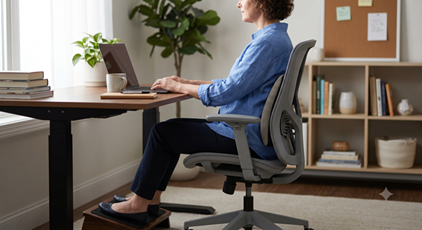
Lower back pain often stems from a lack of lumbar support. Our spines have a natural inward curve at the base, and sitting for long periods without support causes the spine to slump. If your chair does not have built-in support, placing a small pillow or a rolled-up towel against your lower back can help maintain that healthy arch.
Furthermore, your feet should always be flat on the floor with your knees at a ninety-degree angle. If your chair is too high and cannot be adjusted, using a footrest can prevent your legs from dangling, which reduces the pull on your lower back muscles.
The Importance of Movement
Even the most ergonomic workstation cannot replace the need for movement. Our bodies are designed to change positions frequently. We suggest following the 20-20-20 rule to reduce eye strain, but also applying a similar principle to your physical posture. Every thirty minutes, stand up to stretch your chest and hip flexors. These brief breaks reset your posture and improve circulation, preventing muscles from becoming overly tight.
Taking the Next Step Toward Lasting Relief
While self-adjustments are a great starting point, persistent pain often requires a more tailored approach. We understand that every individual has a unique physical makeup and specific lifestyle demands. Professional guidance ensures that you are not just treating the symptoms, but addressing the root cause of your discomfort.
Our approach focuses on one-on-one treatment to ensure you receive undivided attention during every session. We believe in personalized and effective patient-centred care, where your specific recovery goals take center stage. By utilizing cutting-edge equipment and techniques, we help our clients regain their mobility and return to the activities they love.
With a team of multispecialty therapists, we provide a comprehensive range of expertise under one roof. We are committed to being there when you need us most, which is why we remain open six days a week to accommodate busy schedules. If you are ready to move beyond daily aches and find a sustainable solution for your physical health, we invite you to explore how our specialized care can support your journey.
Regain Your Mobility Today
Don’t let desk-related strain limit your potential. Book your consultation with Elevate Physiotherapy.